HTML5 Semantic Elements
Semantic means using tags with clear meanings to build document structure. HTML5 introduced a series of new semantic elements designed to make web page structure clearer and easier to understand.
Using semantic tags instead of ubiquitous <div> elements allows browsers, search engines, and assistive technologies like screen readers to better parse your page content.
What are Semantic Elements?
A semantic element clearly describes its content's meaning to both the browser and developers.
- Non-semantic elements:
<div>,<span>- They don't tell us anything about their content. - Semantic elements:
<form>,<table>,<article>- They clearly define their content.
Main HTML5 Semantic Layout Elements
The following diagram shows how to use HTML5 semantic elements to organize a typical web page layout:
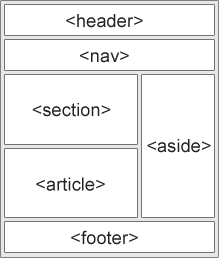
<header>
The <header> element defines the header of a document or section. It usually contains:
- Site logo or mark
- Main headings (
<h1>-<h6>) - Navigation links (
<nav>)
A page can have multiple <header> elements.
<footer>
The <footer> element defines the footer of a document or section. It usually contains:
- Copyright information
- Author information
- Contact details
- Back to top links
<nav>
The <nav> element is specifically for wrapping major navigation links. Not all links should be in <nav>, only those that form major navigation blocks (like main navigation bars, sidebar navigation).
<main>
The <main> element defines the core and main content of a document. A page should contain only one <main> element, and it should not be placed inside <article>, <aside>, <footer>, <header>, or <nav>.
<section>
The <section> element defines an independent part or thematic area in a document. It usually contains a heading. For example, a homepage could be divided into several <section>s for introduction, news, contact information, etc.
<article>
The <article> element defines an independent, self-contained unit of content. It should be content that can logically be independently distributed or reused. For example:
- A forum post
- A blog article
- A news story
- A user comment
<aside>
The <aside> element defines content that is indirectly related to surrounding content but can exist independently. It's often presented as a sidebar for placing:
- Related article links
- Advertisements
- Author bios